Runs
A run is one task from start to finish, across every agent that worked on it. The Runs page lists them, and each run has its own page with a timeline of every step.
Find a run
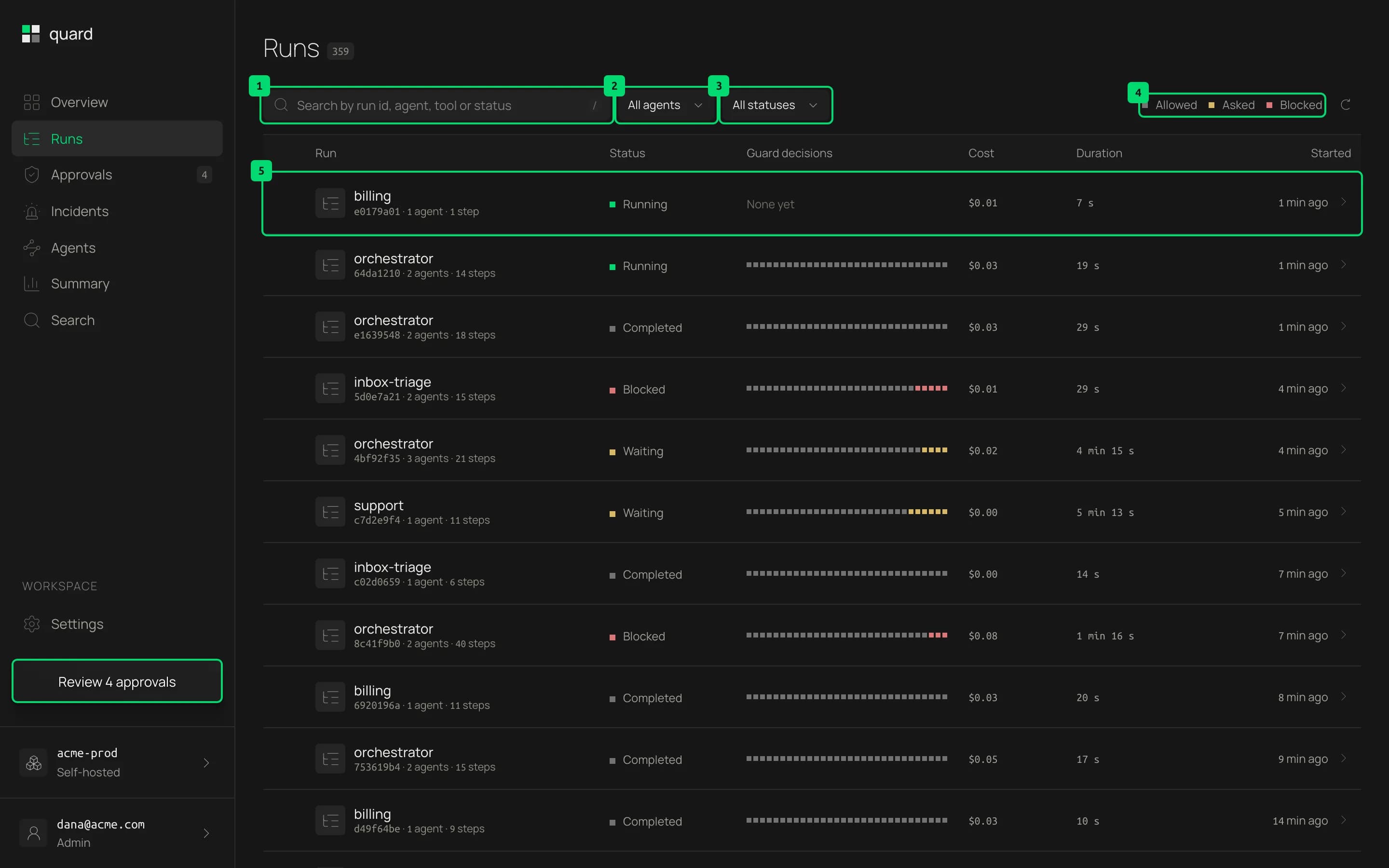
- Search. Find runs by run id, agent, tool or status. Press
/to jump to the field. - Agent. Show the runs of one agent.
- Status. Show only the runs with one status.
- Decision colors. The key for the Guard decisions column, where each run’s decisions form a strip of cells: grey for calls a guard allowed, amber for calls that asked a person and red for calls it blocked.
- A run. The agent that started it, the short run id, how many agents and steps it has, its status, cost, duration and start time. Click the row to open the run.
The list holds the newest 200 runs. The refresh button at the end of the toolbar loads new ones. Before your first run, the table is drawn empty with the note “No runs yet”.
| Status | Meaning |
|---|---|
| Running | Has not ended, and sent an event in the last two minutes |
| Waiting | Has not ended, and a call waits for a person to answer it, however long that takes |
| Completed | Ended, or went quiet for two minutes, without an error or a block |
| Failed | Ended on an error |
| Blocked | Ended on a call that a guard blocked |
A run counts as waiting only while the waiting process still runs. If that process stops, for example after a crash, the request stays open in Approvals and the run’s status comes from the rest of the table.
Read a run
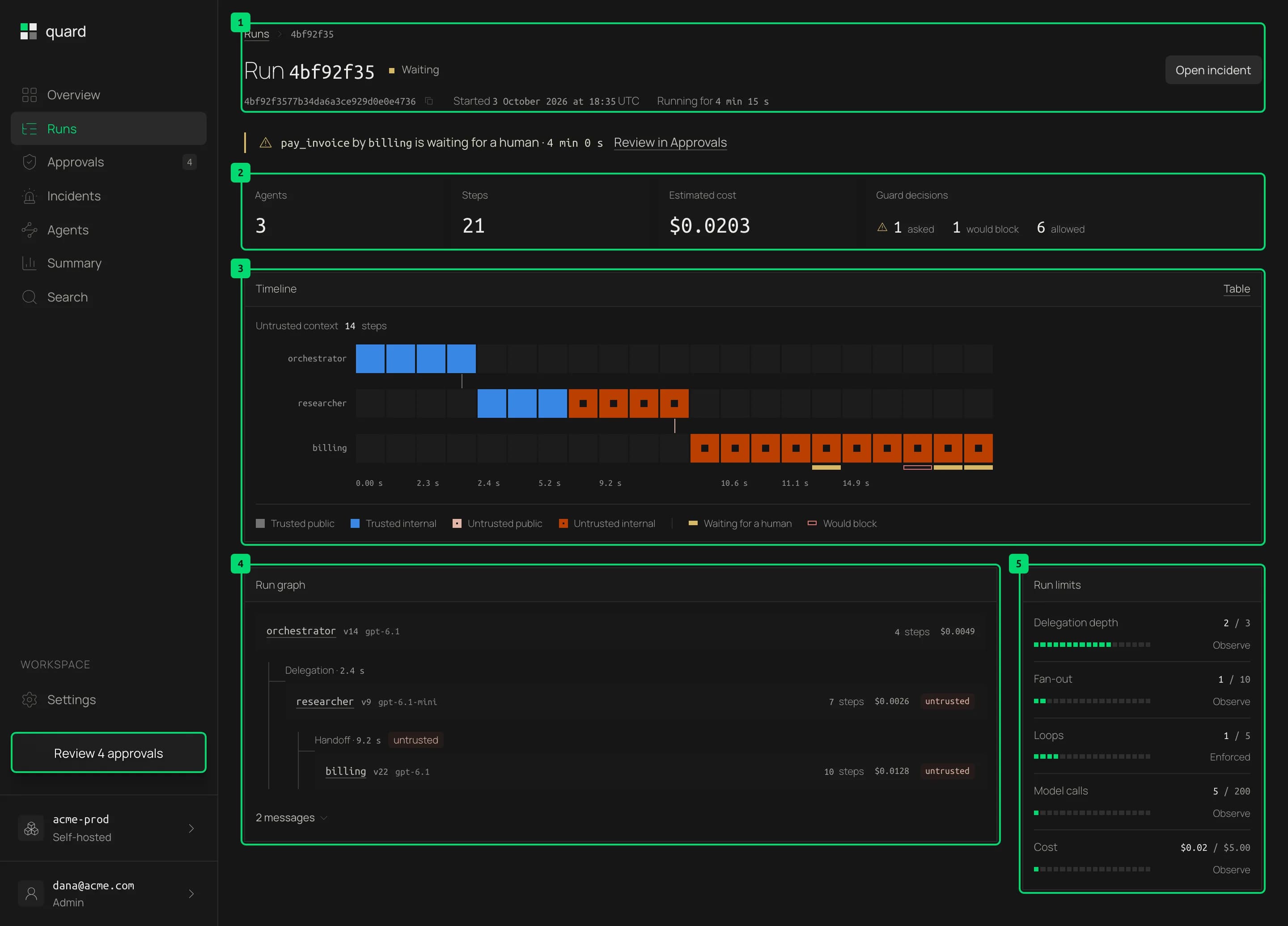
- Header. The run id with a copy button, the status, when the run started and how long it has taken. While a call waits for a person, a note under it names the call, with a link to answer it in Approvals. If the waiting process stopped, Open approval links to the request it left open.
- Summary. How many agents and steps the run has, its estimated cost and its guard decisions. Would block counts decisions by rules in observe mode, which record but never stop a call.
- Timeline. One lane per agent and one cell per step, in time order. A step is a model call, a tool call, a guard decision or a call waiting for a person. A cell’s color is the label of everything the agent had read before that step: grey for trusted and public, blue for trusted and internal, light peach for untrusted and public, and copper for untrusted and internal. Untrusted cells also have a hole in the middle, so you can tell them apart without color. A mark under a cell shows a decision: amber when a person was asked, red when a call was blocked, and an outline for a rule in observe mode.
- Run graph. Who delegated to whom. Each agent shows its model, steps and cost, and its name opens its agent page. untrusted marks an agent that read untrusted content.
- Run limits. How close the run came to each limit: delegation depth, fan-out, loops, model calls and cost. Observe means the limit only records. Enforced means it stops the run. No limits reported means the run sent none.
Untrusted context above the timeline counts the steps that ran after the agent had read untrusted content. In the timeline, the arrow keys move between steps, Enter opens one and Escape clears. Table shows the same steps as a table.
Warnings above the run summary list what the SDK noticed in plain words, such as a tool that is not wrapped with guard() and so is recorded but never stopped, a model request it could not read, or a detector request that failed and why. The same warning from the same agent shows once, with a count.
Look at one step
Click a cell in the timeline, or a row in its table, to open the step in the drawer.
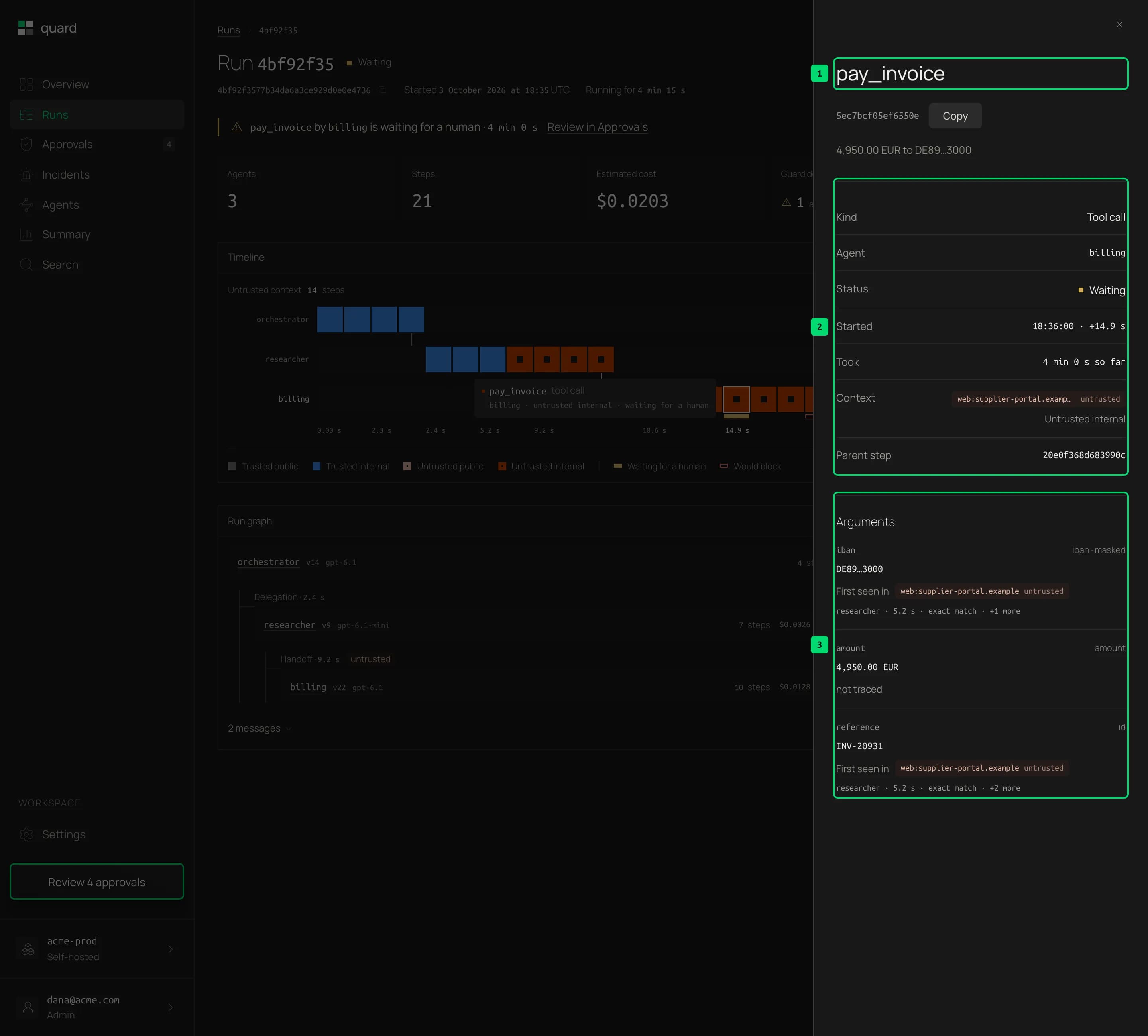
- Step. The tool, model or rule name, the step id with a copy button and a one-line summary of what happened.
- Details. The kind of step, the agent, its status, when it started and how long it took. Context is the label of everything the agent had read before this step, with the origin that made it untrusted. Parent step is the step that led here.
- Arguments. Each argument of a tool call with where its value first appeared. First seen in names the origin, then the agent, the time and how the value matched: an exact match, found inside a longer value, the same host or the same domain. +1 more means it appeared in other places too. model-generated means the value appeared nowhere earlier in the run. not traced means the value is a plain word, date or amount, which Quard does not trace on its own.
Other sections show what the step has. A guard decision shows the guard, rule, mode and reason, and Policy shows the policy file version in force when the decision carried one. A model call shows its tokens, its cost and the tools it asked for. A tool call shows the label of its output, and a failed step shows its error. A call waiting for a person shows its request, with a link to answer it.
The open step is part of the page address, so you can share a link that opens it.